

The Steps Block lets you create clean, numbered, step-by-step instructions inside your documentation. It’s perfect for tutorials, onboarding guides, and how-to articles where clarity matters.
What the Steps Block Is
The Steps Block is a structured container that:
- Automatically numbers each step
- Keeps content visually aligned
- Allows nested blocks inside each step
- Supports text, images, lists, callouts, and code blocks
Demo
Below is a complete demo using sample steps, nested blocks, and code
Add the API Key to WordPress
Paste the API key into your plugin settings.
Nested content example:
- Open your WordPress admin
- Go to Settings → Plugin Settings
- Paste the key into the API field
Verify the Connection
Save the settings and test the connection.
What success looks like:
- No error messages
- Status shows “Connected”
If it fails:
- Double‑check the API key
- Ensure the correct API is enabled
How to Add Steps in PinkDocs
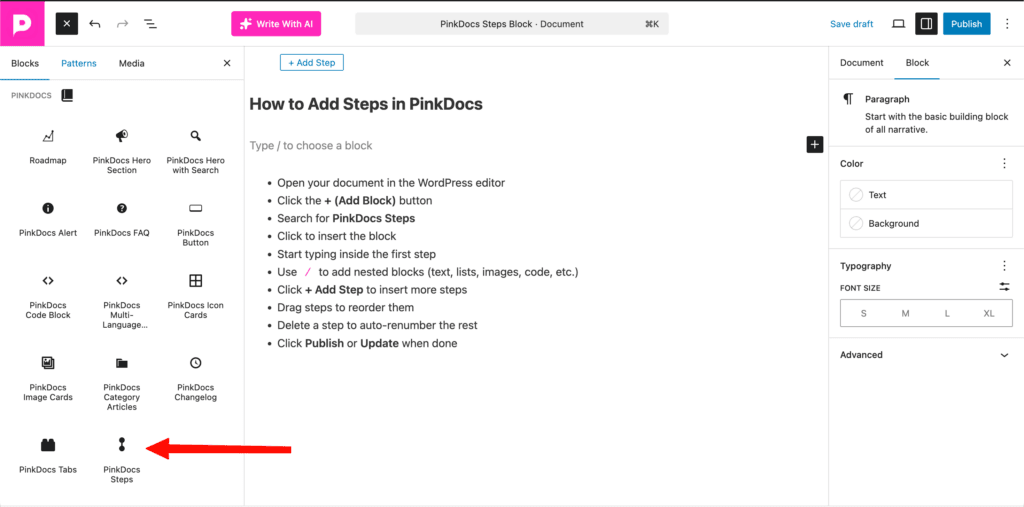
- Open your document in the WordPress editor
- Click the + (Add Block) button
- Search for PinkDocs Steps
- Click to insert the block
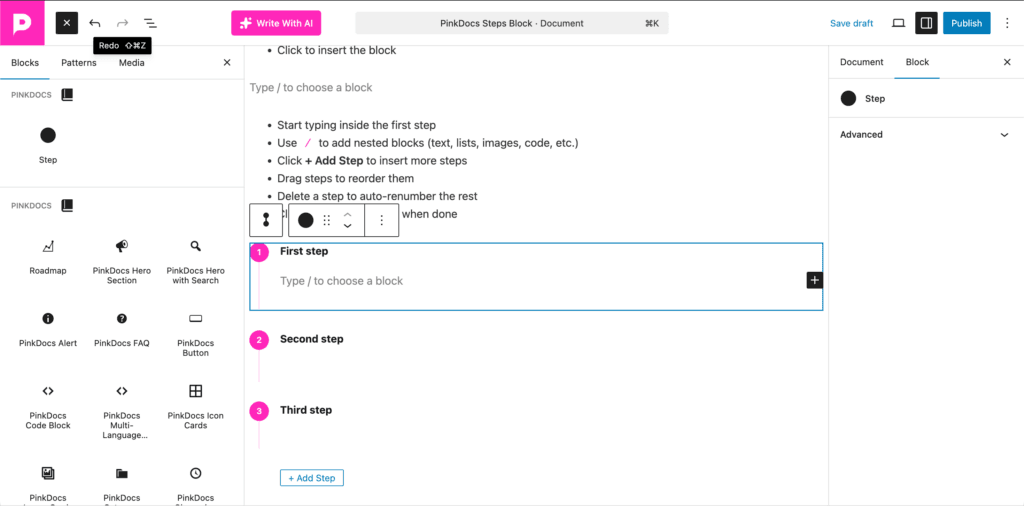
- Start typing inside the first step
- Use
/to add nested blocks (text, lists, images, code, etc.) - Click + Add Step to insert more steps
- Drag steps to reorder them
- Delete a step to auto-renumber the rest
- Click Publish or Update when done
You’re all set 🎉
The Steps block helps you create clear, structured, step-by-step documentation that’s easy to follow and visually consistent. Use it whenever order matters and you want readers to move from start to finish without confusion. Add steps, nest blocks, include code, and build guides that just make sense.